


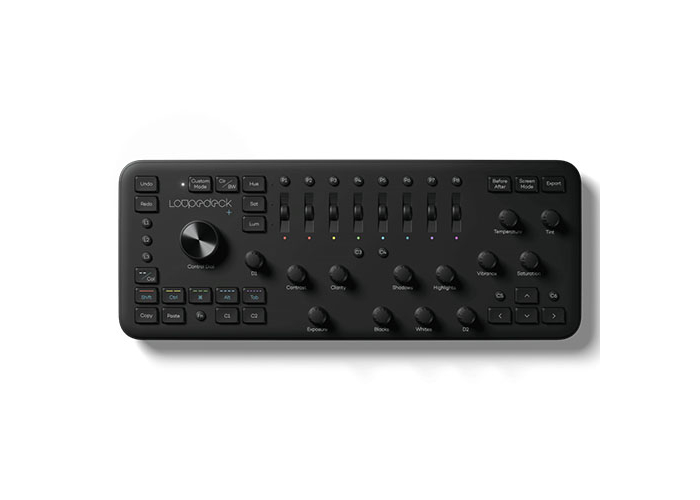
Loupedeck Photo Video Edit Console

Loupedeck+ Photo/Video Edit Console
(Loupedeck 888500)
We Think You Should Know
- Genuine Australian Loupedeck Warranty
- Peace of Mind Purchase Guarantee
- Custom Console for Video & Photo Editing
- Quick Access to the Tools You Need
- Native Compatibility with Adobe Lightroom Classic/ Photo Shop CC & Premiere Pro CC/ Capture One/ Adobe After Effects CC/ Final Cut Pro X/ Adobe Audition/ Skylum: Aurora HDR
Overview
Meet the console that makes photo and video editing second nature and lets you focus on what’s really important – achieving the perfect edit.
Made for pros, enthusiasts and everyone in between, Loupedeck+ has an intuitive user interface with controls for retouching, grading and fine-tuning your work.
Loupedeck+ is custom-built to enhance the Adobe Lightroom, Adobe Premiere Pro CC, Adobe Photoshop and Final Cut Pro X editing experiences.
The functions you use are all organized by category. So instead of jumping between menus, panels and submenus, they’re all in one place – right at your fingertips. And full screen mode editing lets you edit without ever having to take your eyes off your image or video.
With Loupedeck+, your hands, eyes and creativity work together in perfect editing harmony.
Features
Ergonomics
BUTTON, DIALS AND SLIDERS RIGHT WHERE THEY SHOULD BE.
Loupedeck+’s ergonomic hands-on layout gives you quick and natural access to the controls you use most. Push to color grade in full-screen mode, turn right to add shadows, tap to copy, and much more.

INCREMENTAL EDITS ARE SECOND NATURE.
Loupedeck+’s tactile dials let you edit things like contrast, clarity and exposure in precise increments, giving you unprecedented control of your image or video.
IntuitiveQUICK ACCESS TO THE TOOLS YOU USE.
Loupedeck+ has been meticulously designed by a team that deeply understands the ins and outs of the editing workflow – with input from the Loupedeck community. Every button, dial, slider and function is made to work intuitively and enhance the entire editing workflow.
Easy to Use
SUPER EASY SETUP.
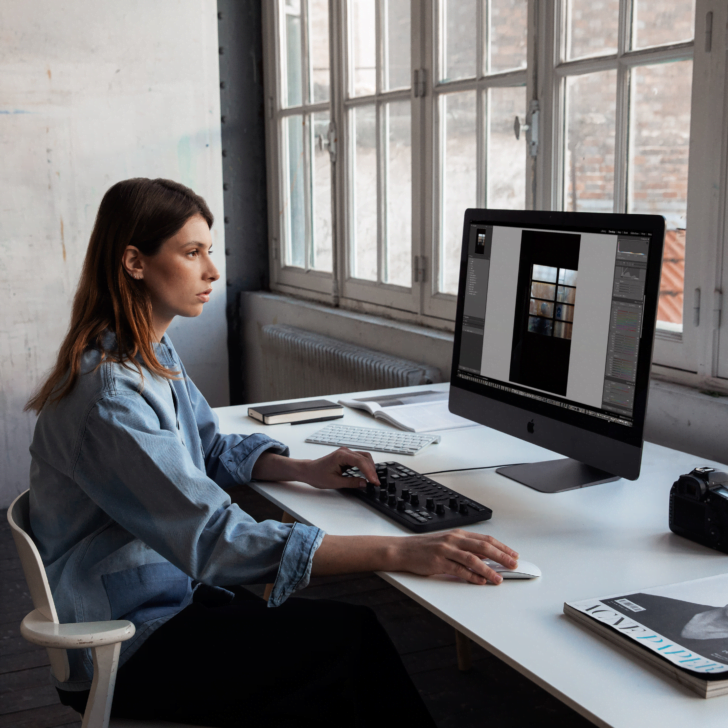
Loupedeck+ is designed to work seamlessly with Adobe Lightroom, Adobe Premiere Pro CC, Adobe Photoshop and Final Cut Pro X, and more. Setup is simple – just download the software and start editing in a matter of minutes.
Customizable
TAKE CONTROL AND CUSTOMIZE.
Create your own presets to customize your Loupedeck+ to fit your own personal workflow. Use Loupedeck+’s multi-layer customizable buttons, dials and sliders to suit your personal workflow.
NATIVE COMPATIBILITY
Loupedeck+ includes a variety of deep native integrations to leading software that offer a more user-friendly experience. Unlock time-saving and advanced features, such as Full-Screen Mode Editing, exclusively available through Loupedeck native integrations.
Compatible with:
Adobe Lightroom Classic
Editing images is faster, smoother and more customized with Loupedeck+ and Lightroom Classic – the ultimate editing experience. Made for pros, enthusiasts and everyone in between, Loupedeck+ has an intuitive user interface with controls, sliders and dials for retouching, grading and fine-tuning your work. And full-screen editing lets you focus all your attention on your image and be more creative. Loupedeck+ is custom-designed to enhance the entire Lightroom experience, giving you quick access to all the tools and functions you need to create the perfect image.
*Lightroom 6 compatibility extends to versions v.8.2.1 and up, starting from Loupedeck Software versions 2.x+ for both Loupedeck+ and Loupedeck Original.
Adobe Photoshop CC with Camera RAW
You asked, we answered! You can now use your Loupedeck+ with Adobe Photoshop CC and Camera Raw to achieve a totally smooth, seamless and customized editing workflow. Loupedeck+ gives you quick, easy and direct access to the functions, layers and other Photoshop tools you use. Loupedeck+ is an awesome addition to your mouse or pen. Plus, it’s easy to get started with a very short learning curve.
Adobe Premiere Pro CC
Welcome to the most intuitive and customized video editing experience out there. Loupedeck+ is designed to both simplify and enhance the Premiere Pro editing experience. The console comes with all the functions you need to get started right away, like exposure and contrast. But it delivers much more with up to four layers of functionality for its buttons and dials. Loupedeck+ is fully customizable to match your personal workflow.
Capture One
The Loupedeck community wanted compatibility with the Capture One Pro Beta support is now here. You can already use your Loupedeck+ to do things like color adjustment in Capture One Pro, and we’re working to make the editing experience even better as the Capture One Pro Beta support evolves. In the meantime, let us know what you think – your feedback will help us develop the best possible Capture One Pro editing experience.
Adobe After Effects CC
Loupedeck+ is compatible with Adobe After Effects CC. This integration provides a faster, more affordable and intuitive solution to editing visual effects and motion graphics.
Final Cut Pro X
The pros already love Final Cut Pro. And Loupedeck+ makes editing videos with Final Cut even faster, smoother and more precise. Loupedeck+ is custom-designed to enhance the entire Final Cut Pro X editing experience, giving you quick access to all the tools and functions you need. Its intuitive user interface features controls, sliders and dials for color grading and fine-tuning your work. And you can edit in full-screen mode, which means you can focus all your attention on what really counts – nailing the perfect edit. Loupedeck+ is also simple to set up and will quickly become a completely natural part of your editing workflow. Give it a spin and see for yourself.
Adobe Audition
Loupedeck+ is compatible with Adobe Audition, which means you can use it to take your audio editing experience to the next level. This integration offers a complete editing solution for video editors looking to upgrade to a faster, more affordable and intuitive editing workflow.
Skylum: Aurora HDR
Use Loupedeck+ to create awesome edits with Aurora HDR. Loupedeck’s super intuitive dials, buttons and sliders are designed to make editing with Aurora HDR an even smoother and more seamless experience. Great for beginners, heavy users and everyone in between Loupedeck+ has all the basic editing functions you need and makes it quick and easy to find them. And with easy setup and a short learning curve, you can start editing in minutes.
SYSTEM REQUIREMENTS
OPERATING SYSTEM:
Win 10, Mac 10.12 or higher
SUPPORTED SOFTWARE:
- Lightroom Classic 7.4 or later
- Lightroom 6*
- Photoshop CC 20.0 or later with Camera Raw
- Premiere Pro 2018 or 2019
- Final Cut Pro X 10.4.5 or later
- Capture One Pro 11 or later – Beta
- Audition 2019
- After Effects 2019
- Skylum Aurora HDR 2018 (1.2)
Lightroom 6: Compatibility for Lightroom 6 extends to versions v.8.2.1 and up starting from Loupedeck Software versions 2.x+ using Loupedeck+ and Loupedeck Original.
SYSTEM REQUIREMENTS
OPERATING SYSTEM:
Win 10, Mac 10.12 or higher
SUPPORTED SOFTWARE:
- Lightroom Classic 7.4 or later
- Lightroom 6*
- Photoshop CC 20.0 or later with Camera Raw
- Premiere Pro 2018 or 2019
- Final Cut Pro X 10.4.5 or later
- Capture One Pro 11 or later – Beta
- Audition 2019
- After Effects 2019
- Skylum Aurora HDR 2018 (1.2)
Lightroom 6: Compatibility for Lightroom 6 extends to versions v.8.2.1 and up starting from Loupedeck Software versions 2.x+ using Loupedeck+ and Loupedeck Original.
- Loupedeck+ Photo/Video Edit Console
The information below is required for social login
Sign In
Create New Account